Visited Map: a world map component for shadcn/ui
- Published on
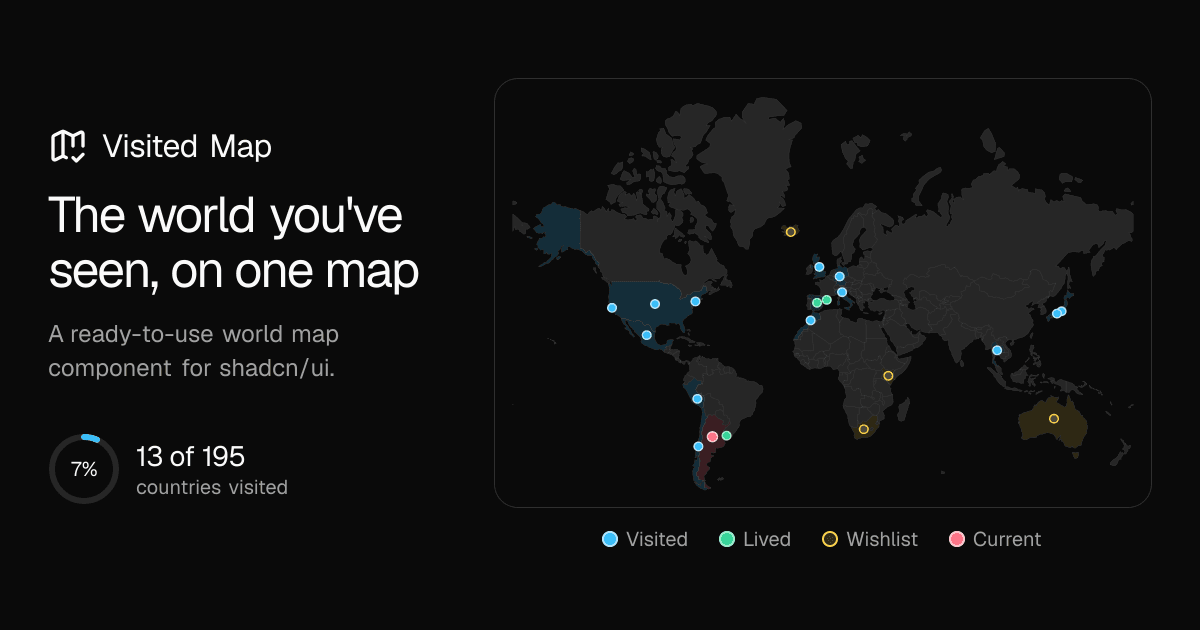
I've traveled a lot and spent several years as a digital nomad. Along the way, I wanted a simple way to keep track of the places I'd been and the ones I still wanted to visit.
I thought it would be nice to have a map on my personal site showing all of that.
Nothing fancy: a world map with the countries I've visited highlighted, maybe a few cities. But most map libraries seemed like overkill for something so simple. They often need external map tiles, API keys, and a lot of JavaScript.
I looked for a shadcn/ui component that could do this and couldn't find one. So I built Visited Map.
What it does
- No tiles or API keys. Everything needed to render the map comes with the component.
- No JavaScript by default. The map renders as a simple SVG on the server.
- Light and dark mode. Uses your shadcn/ui theme colors.
- Countries and cities. Highlight places you've visited, lived in, want to visit, or are currently in. You can also add city pins.
- Stats. See how many countries you've visited and what percentage of the world that represents.
- Zoom. Optional zoom and pan, including the ability to focus on a specific country.
- Fully customizable. Like other shadcn/ui components, the source code lives in your project.
Simple to use
The first version required a list of places with coordinates. It worked, but I realized most people just wanted to select countries without worrying about latitude and longitude.
So I changed it to use country codes instead:
countries={{ current: "AR", lived: ["IT"], visited: ["BR", "JP"] }}
You can still add cities if you want to show specific places, but they're optional.
The Map Builder
I also wanted people to set up their maps without having to look up country codes or write everything by hand.
So I built the Map Builder. You select the countries you've visited, where you've lived or want to go, and optionally add cities. The builder generates the code for you to copy into your project.
You can see the map update as you make changes and switch between the preview and the generated code.
Where do you put a pin?
This was an interesting problem I hadn't thought about at first.
When you mark a country, the component needs to decide where to place its pin. Using the geographic center sounds reasonable, but that point can sometimes fall outside the country, especially with islands or unusual shapes.
I ended up using label points from Natural Earth, which are designed for placing country names on maps.
That's why Russia's pin appears in its European part, rather than somewhere in Siberia.
In the shadcn/ui directory
After building the component, I submitted a pull request to add it to the shadcn/ui community registry directory.
It was accepted, and Visited Map is now listed in the official directory.
You can install it with:
npx shadcn@latest add @visited-map/visited-map
Try it
You can try the Map Builder, select the countries you've visited, and copy the generated code.
There are more examples in the docs, and the project is open source on GitHub.
If you build something with Visited Map, I'd love to see it.
Need a Senior Software Engineer?
I'm open to new roles. Let's talk about what your team is building.